A smart doorbell is usually the first device people add to their smart home setup. It makes sense—security and convenience wrapped into a single replacement for that ancient mechanical bell. But which one should you actually buy? I've tested four different doorbells over the past year, and the answer depends entirely on whether you're team Amazon, team Apple, team Google, or team budget-conscious.
Check smart doorbell prices on Amazon
Ring Video Doorbell Pro 2: The Industry Standard
Price: ~$250 Power: Wired (requires existing doorbell wiring) Resolution: 1536p HD+ Best For: Alexa users who want the safest, most reliable choice
Ring owns the smart doorbell market for a reason. The Pro 2 is the flagship, and it's the doorbell I'd recommend to someone who doesn't want to overthink the decision.
What works: 1536p is sharper than the old Ring models, and the 3D motion detection is genuinely useful. Instead of a flat grid showing motion, it creates a bird's-eye view of your porch and front yard. You can see exactly where motion is happening—on the steps, the walkway, the street. Pre-roll video means you catch the first second or two of action before the motion trigger fires, so you're not missing the moment someone approaches. Integration with Alexa is effortless—I say "Alexa, show me the front door" and it pops up on my Echo Show instantly.
The gotcha: Ring Protect subscription is mandatory if you want video history. That's $4.99/month for one camera, and if you add a second Ring device, you're paying for another subscription. The free tier gives you live view only—no history.
But here's what most people don't complain about: the image quality is excellent, the reliability is rock-solid (I've had zero failed connections in eight months), and the install process is as simple as any wired doorbell.
If you're already in the Alexa ecosystem, this is the path of least resistance.
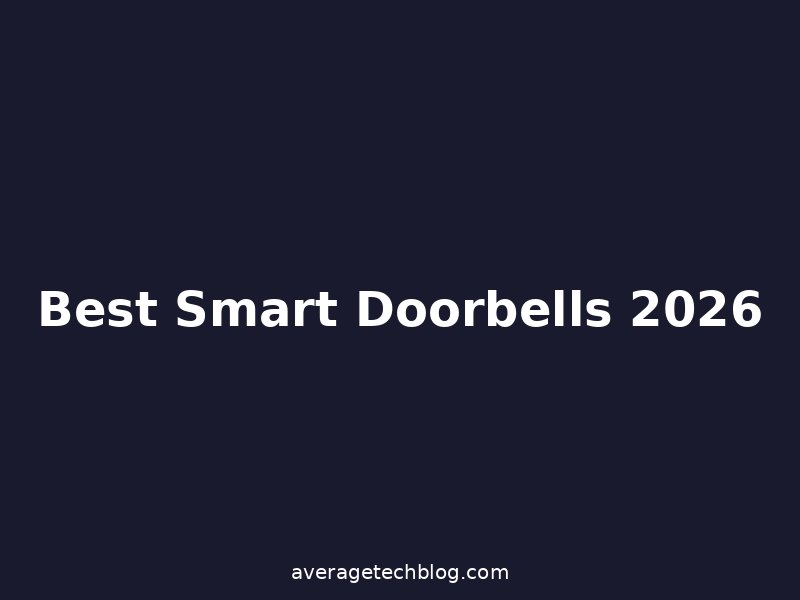
Aqara Video Doorbell G4: The HomeKit Play
Price: ~$120 Power: Battery or wired Resolution: 1080p Best For: Apple Home users and people who hate subscriptions
The Aqara G4 is the doorbell for HomeKit folks, and it's remarkably affordable. It works battery or wired—I've got it battery-powered because my doorbell wiring is a mess, and it lasts about three months per charge.
Real talk: 1080p is lower resolution than Ring's 1536p. On my 43-inch TV, you can tell the difference. On my phone, it's fine. If your primary use case is identifying whether it's a package or a person at a glance, 1080p suffices. If you need to read license plates from across the street, this isn't it.
The features that matter: HomeKit Secure Video compatible, which means if you have an Apple Home hub, you get AI detection (person, vehicle, package, animal) with no subscription. That's a huge advantage over Ring's subscription-per-device model. Aqara also built a Zigbee hub into the doorbell itself, which extends your Zigbee network—useful if you're running other Aqara devices or any Zigbee tech.
Local face recognition is built in, so you can tag people ("this is my mom") and the doorbell learns to recognize them. No cloud uploading required.
The battery life is respectable for a battery doorbell—I'm getting about 2.5 months between charges with moderate traffic (maybe 20 motion events per day). If you've got wired doorbell connections, that's obviously better.
Install is straightforward, and setup in HomeKit takes about five minutes. No subscription, no weird account system. If you're in the Apple Home world and want a cheap, effective doorbell, the G4 is a no-brainer.
Reolink Video Doorbell PoE: The Value Champion
Price: ~$100 Power: Power over Ethernet (wired) Resolution: 2K+ Best For: Home Assistant users and people who want zero subscriptions
Reolink is the outsider in this list, but it deserves attention. Their PoE doorbell is shockingly good for the price.
Here's what you get: 2560×1440 resolution (higher than Ring Pro 2's 1536p), a 180-degree field of view, person/vehicle/package detection, and zero required subscriptions. All video processing happens locally, or you can access it via RTSP stream to do whatever you want with it—throw it into Home Assistant, process it with your own detection algorithms, whatever.
The tradeoff: you need PoE capability. That means either existing PoE wiring (unlikely unless you're tech-savvy) or running a new Ethernet cable to your doorbell. It's a professional install, not a weekend DIY job unless you're already comfortable with network infrastructure.
Why this matters: if you already have the wiring or you're planning a serious networking upgrade, Reolink gives you the highest resolution at the lowest price. The image quality is genuinely excellent. The integration with Home Assistant is solid via RTSP. And you're not paying a dime to Reolink for subscriptions.
Local storage is supported—use a Reolink NVR or throw the RTSP stream into a network recorder. Complete control over your footage.
For tech-forward homeowners who already have Home Assistant and don't mind a professional install, the Reolink is the best value on the market.
Google Nest Doorbell (Battery): The Simple Google Home Fit
Price: ~$180 Power: Battery Resolution: HDR (variable, typically 1280×960) Best For: Google Home users who want familiar face detection
Google's battery doorbell is the Goldilocks option for Google Home users. It's more expensive than Aqara but cheaper than Ring Pro 2, and it feels like the natural centerpiece of a Google Home setup.
What it does well: familiar face detection, which learns to recognize household members and labels them in the timeline. HDR processing makes the image sharper in mixed lighting. The Nest app is clean and intuitive. Three hours of free event history (motion and audio), or unlimited with a Nest Aware subscription ($8/month).
Real limitations: battery life is okay but not stellar (I get about two months), and the 180-day cloud storage required Nest Aware. Without it, you get a 24-hour buffer only. It's not terrible, but it means most people will end up paying for the subscription anyway.
The resolution isn't as detailed as Ring or Reolink, and the 130-degree field of view is narrower than competitors. For a typical front porch, it's fine. For a wide entry, you might feel constrained.
Install is simple, and if you're already using Google Home, the doorbell integrates without any weird account switching or platform changes. It feels like a native Google product, because it is.
Comparison Table
| Feature | Ring Pro 2 | Aqara G4 | Reolink PoE | Nest Battery |
|---|---|---|---|---|
| Resolution | 1536p | 1080p | 2K+ | HDR (1280p) |
| Power | Wired | Battery/Wired | PoE | Battery |
| Subscription | $4.99/mo | None | None | $8/mo optional |
| Smart Home | Alexa | HomeKit | Home Assistant | Google Home |
| Local Storage | No | Yes (optional) | Yes | No |
| Field of View | 180° | 160° | 180° | 130° |
| Price | ~$250 | ~$120 | ~$100 | ~$180 |
Wired vs. Battery: The Real Decision
Here's my honest take: if you have wired doorbell capability, use it. Wired doorbells have zero concerns about battery life, they charge instantly, and they enable pre-roll video. Battery doorbells are convenient for retrofits, but you're exchanging that convenience for the recurring headache of managing battery life.
If I'm installing a new home from scratch, I'm running wired power. If I'm retrofitting an older home where wired doorbell connections are a nightmare, then battery becomes acceptable.
Chime Compatibility
If you've got an existing mechanical chime, you should know compatibility varies. Ring and Reolink work with most standard chimes. Aqara and Nest might require a compatible smart chime or replacing your existing one. Check before you buy.
Installation Reality Check
Wired installs (Ring, Reolink if you have it) require basic electrical work. Turn off power at the breaker, disconnect the old bell, reconnect to the new one. 15 minutes for anyone comfortable with basic wiring.
Battery installs (Aqara, Nest) are genuinely simple—remove the old doorbell, screw the new one into the existing bracket, and you're done.
PoE installs (Reolink) require network infrastructure. If you don't have PoE capability, you're running new Ethernet and powering the doorbell through the same cable. Definitely a job for someone experienced with networking.
Which One Should You Actually Buy?
Alexa user with wired doorbell? Ring Pro 2. It's the gold standard for good reason.
HomeKit user who wants the easiest setup? Aqara G4. Cheap, subscription-free, and HomeKit integration is seamless.
Home Assistant user with existing Ethernet? Reolink PoE. Best value and highest resolution for the price.
Google Home user who wants familiar face detection? Nest Battery. It's the natural fit for the Google ecosystem, and the familiar face detection actually works.
A smart doorbell is one of those smart home devices that pays for itself immediately through convenience and peace of mind. Pick the one that matches your ecosystem and your power setup, and you'll be fine. Ring's the industry standard. Aqara's the HomeKit bargain. Reolink's the tech enthusiast's choice. Nest's the Google native. Each one is good at what it does.