If you've been running MyQ on Home Assistant, you probably remember the sad day in late 2023 when Chamberlain pulled the plug on the free integration. Suddenly you're looking at cloud-only access, subscription fees, and some janky workarounds. I spent weeks after that day grumbling about it before I discovered ratgdo—and honestly, it's made my garage door setup better than it ever was with MyQ.
What Exactly Is ratgdo?
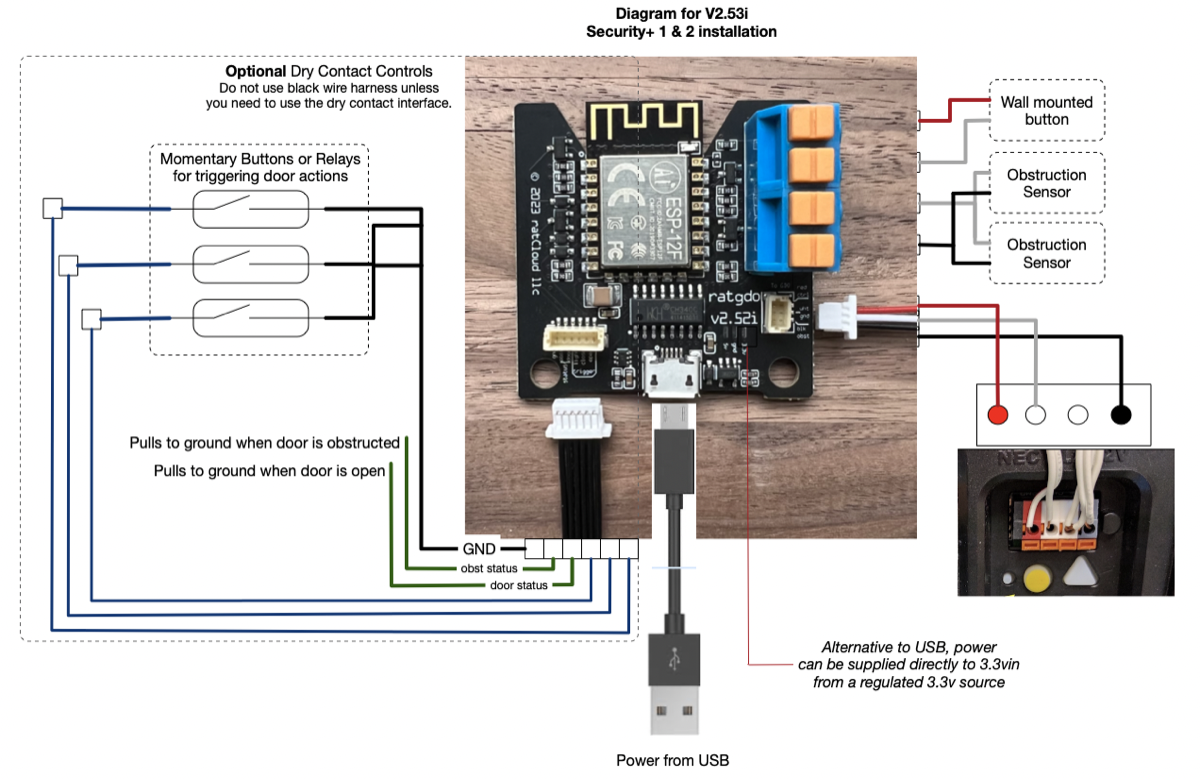
ratgdo is a small circuit board—about the size of a car key fob—that connects directly to your Chamberlain or LiftMaster garage door opener using Security+ 2.0 protocol. It's an ESP32 microcontroller running ESPHome firmware that gives you full local control over your garage door through Home Assistant. No cloud. No subscription. No need to touch the MyQ app ever again.
The hardware costs around $35, and the install takes maybe 20 minutes if you're comfortable with a screwdriver and three electrical connections.
Why This Beats Every Other Option
I installed one of these last month, and the first thing that struck me was the simplicity. Three wires. That's it. You pull the cover off your garage opener, locate three connection points, and wire the ratgdo board to them. There's no fussing with cloud APIs or creating accounts you didn't ask for.
The feature list is genuinely impressive for the price:
- Open, close, or stop the door remotely
- Real-time door status (open, closed, or moving)
- Obstruction detection—if something blocks the door, you know about it immediately
- Motion sensor integration
- Light control for your garage opener light
- Ability to lock out wired remotes if you want them disabled
The ratgdo32 version adds Matter support, which means you can control your garage door through Apple Home, Alexa, and Google Home simultaneously—not just Home Assistant.
Compare that to what you get with Meross MSG200 ($50), which is cloud-dependent and doesn't give you true status. Or stick with MyQ and pay the subscription fee indefinitely. The ratgdo leaves both of them in the dust for Home Assistant users.
Installation—Seriously, It's Easy
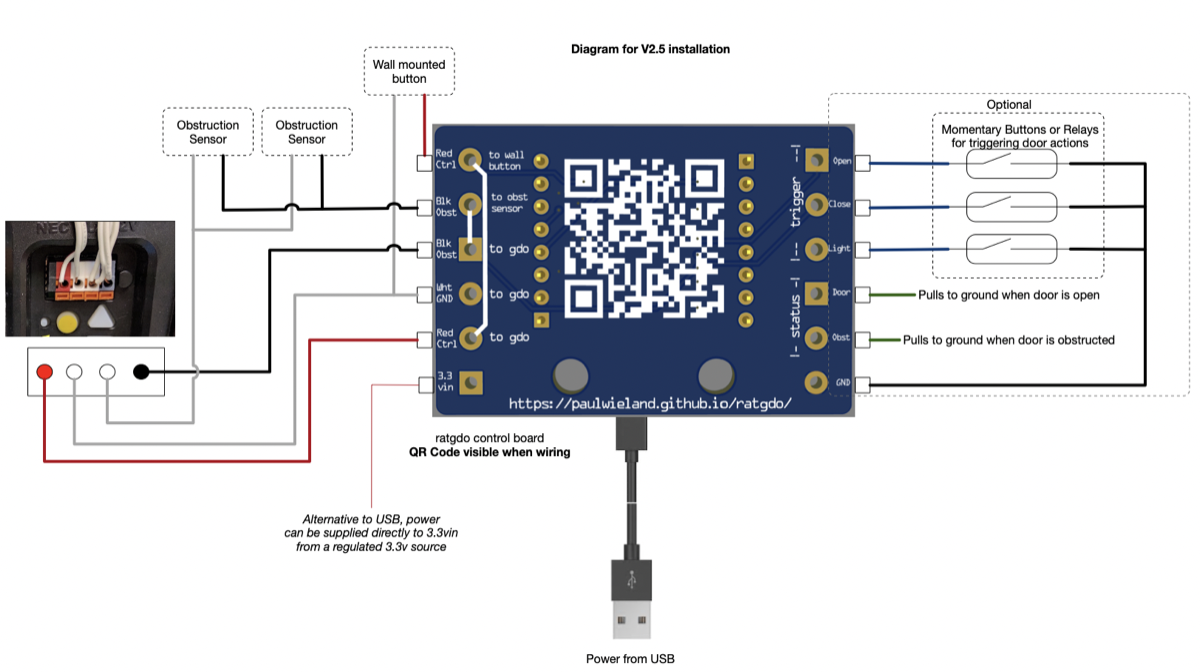
I'll be honest—I was expecting something complicated. The documentation is solid, though, and the install process is straightforward.
First, kill the power to your garage opener. Then open the terminal connection block on your opener and identify the three contact points: GND, C (common), and O (open). The ratgdo board has three corresponding pads.
I used 18-gauge stranded wire and solder connections, which took me about five minutes. Some people use wire connectors if they prefer to avoid soldering. Either works fine.
Next, flash the board with ESPHome firmware using the ratgdo GitHub repository instructions. It's all web-based—no serial cable needed. Just plug the board into your computer via USB-C, navigate to the flasher web tool, and it takes about two minutes.
Once it's flashed, the board broadcasts a Wi-Fi network. You connect to it, provide your Wi-Fi credentials, and it joins your network. Then you add it to Home Assistant as an ESPHome device.
Total time: 20 minutes if you move deliberately. I stretched mine out to 45 minutes by double-checking everything twice.
Home Assistant Integration Is Perfect
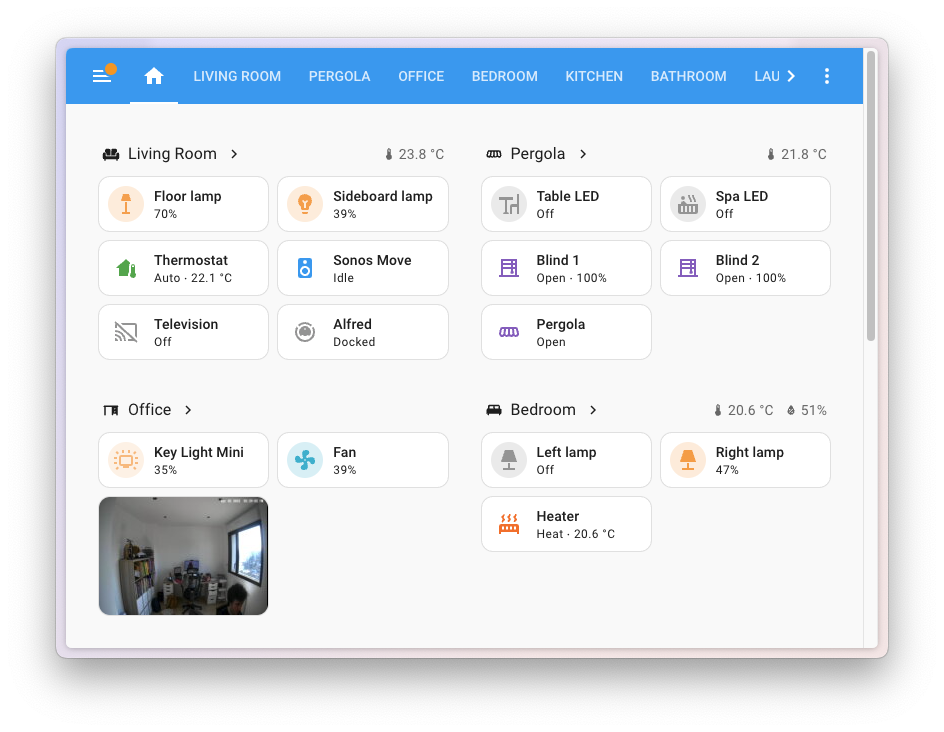
Once it's in Home Assistant, you get a cover entity that integrates seamlessly with your automations. I've got mine set to auto-close at 10 p.m., alert me when it opens during the day if I'm away, and integrate with my front door camera for a full security picture.
The local control means near-zero latency. Press the button in Home Assistant and the door responds in less than a second. No cloud round-trip. No API rate limits. Just instant response.
The Only Real Limitations
Honestly, there aren't many. The ratgdo assumes you've got a Security+ 2.0 opener—if you've got an older fixed-code opener, you'll need a different approach. But most Chamberlain and LiftMaster models from the last 15 years use Security+ 2.0.
One thing to note: the board consumes just enough power that you can't reliably power it from the door sensor wires. You'll need to run a small USB power adapter into your garage, or hardwire a 5V supply. It's a minor inconvenience but not a dealbreaker.
Should You Buy It?
If you're running Home Assistant and you've got a Chamberlain or LiftMaster garage door, this is the obvious choice. It costs less than a pizza, it works better than any cloud solution, and it gives you exactly what you want: local control without corporate gatekeeping.
Pick one up on Amazon. You'll be done with installation before dinner time.